
Scenario one: single applicant with one child and 40% custody care
For a single applicant with one child with 40% custody care with a registered child support arrangement in place.
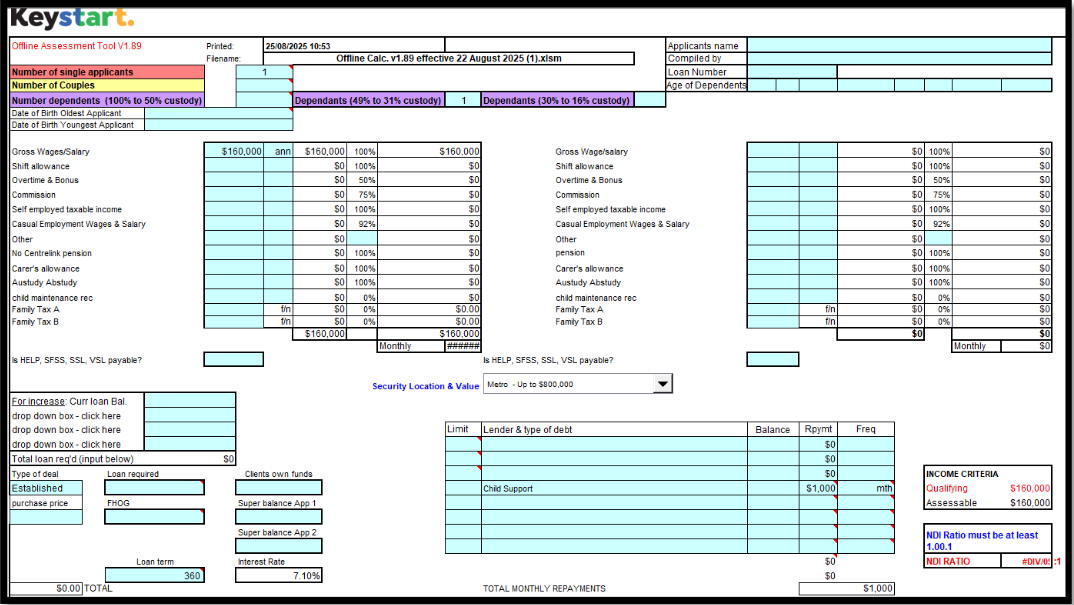
Offline calculator:
1. Relationship status: Enter the customer as either single or a couple at the top of the calculator.
2. Number of dependents: Enter the number of children into the relevant custody care percentage box. In this case, custody care is 40%, so enter 1 child in the 40% box.

3. Child support payments: Any child maintenance payable as determined by Services Australia must be entered as a commitment/liability.
4. Living expenses: Enter the customer's declared living expenses into the living expenses section. The customer must also include provision for expenses related to caring for the child 40% of the time in their declared living expenses.
Lodging an application through Loanapp:
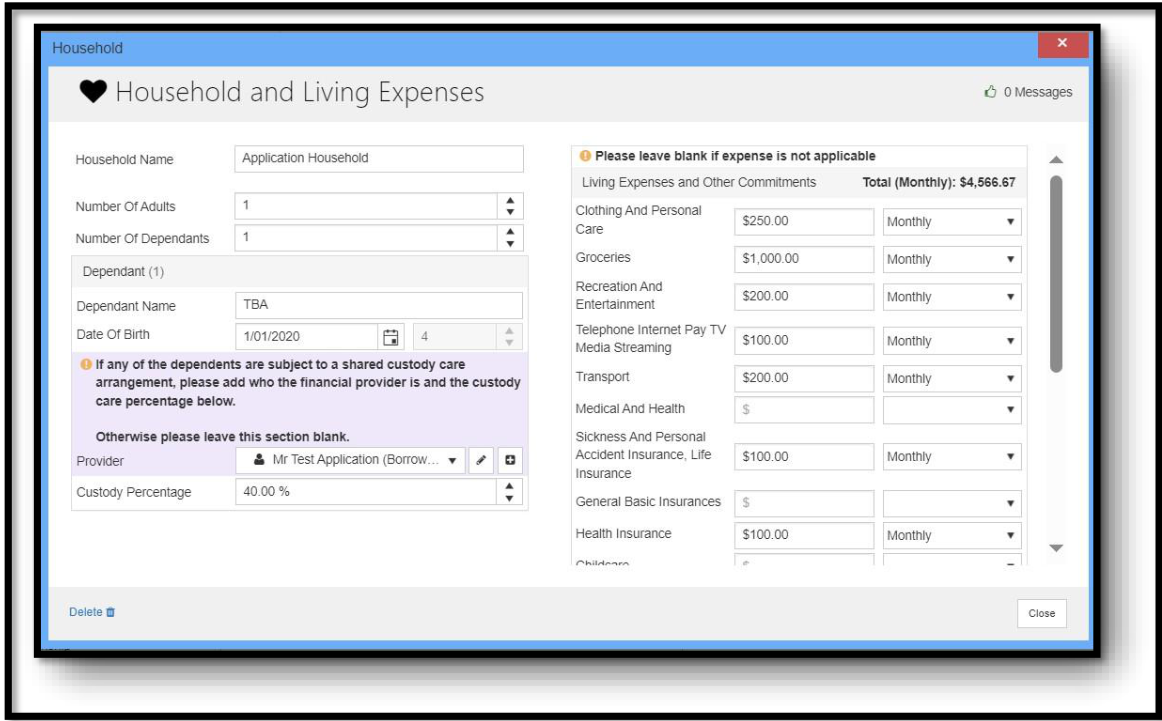
1. Applicant details: Enter the customer as a single applicant.
2. Household and Living Expenses: Under this section, enter 1 child in the Number of Dependents field.
3. Dependent information: Enter the dependent's name, date of birth, and the applicable custody care percentage as per the registered child support agreement, in this case, 40%.
4. Customer's living expenses: Enter the customer's declared living expenses into the living expenses section of Loanapp. The customer must also include a provision for any additional expenses for caring for the child 40% of the time (e.g., food, recreation, clothing) in their declared living expenses.
5. Child and spousal maintenance: Enter the child maintenance payable as determined by Services Australia.

Scenario two: single applicant with one child and more than 50% custody care
For a single applicant with one child with more than 50% custody care with a registered child support arrangement in place.
Offline calculator:
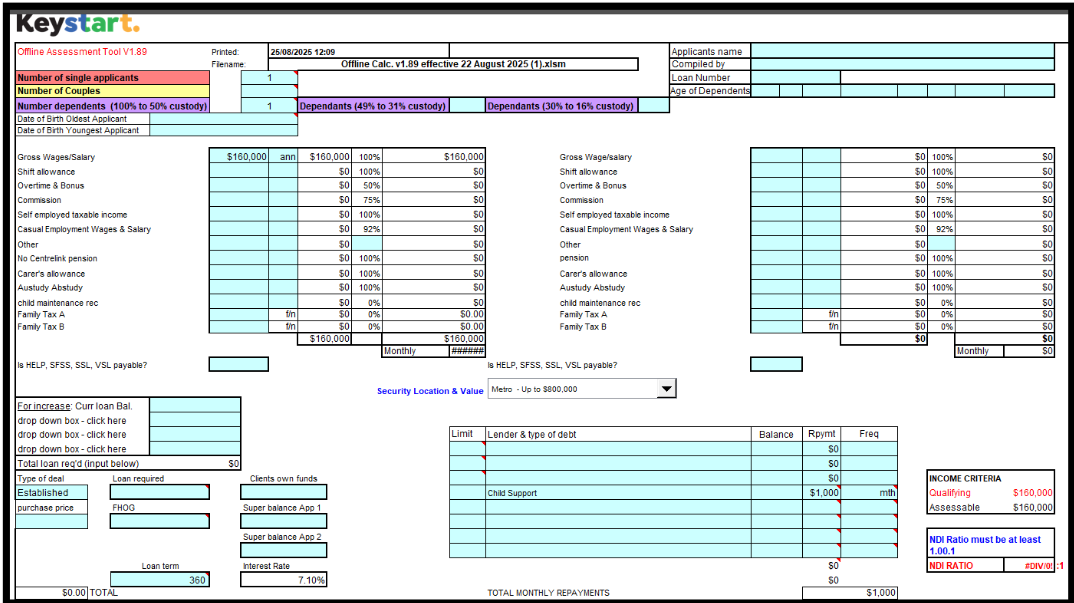
In this example, the child custody arrangement is 60%.
1. Relationship status: Enter the customer as a single applicant at the top of the calculator.
2. Number of dependents: Enter the number of children into the relevant custody care percentage box. In this case, custody care is 60%. Enter 1 child in Number dependents (100% to 50% custody) as below.
.png?sfvrsn=2c6c97f6_1)
3. Child support payments: Any child maintenance payable as determined by Services Australia must be entered as a commitment/liability.
4. Living expenses: Enter the customer's declared living expenses into the living expenses section. The customer must also include provision for expenses related to caring for the child 60% of the time in their declared living expenses.
Lodging an application through Loanapp:
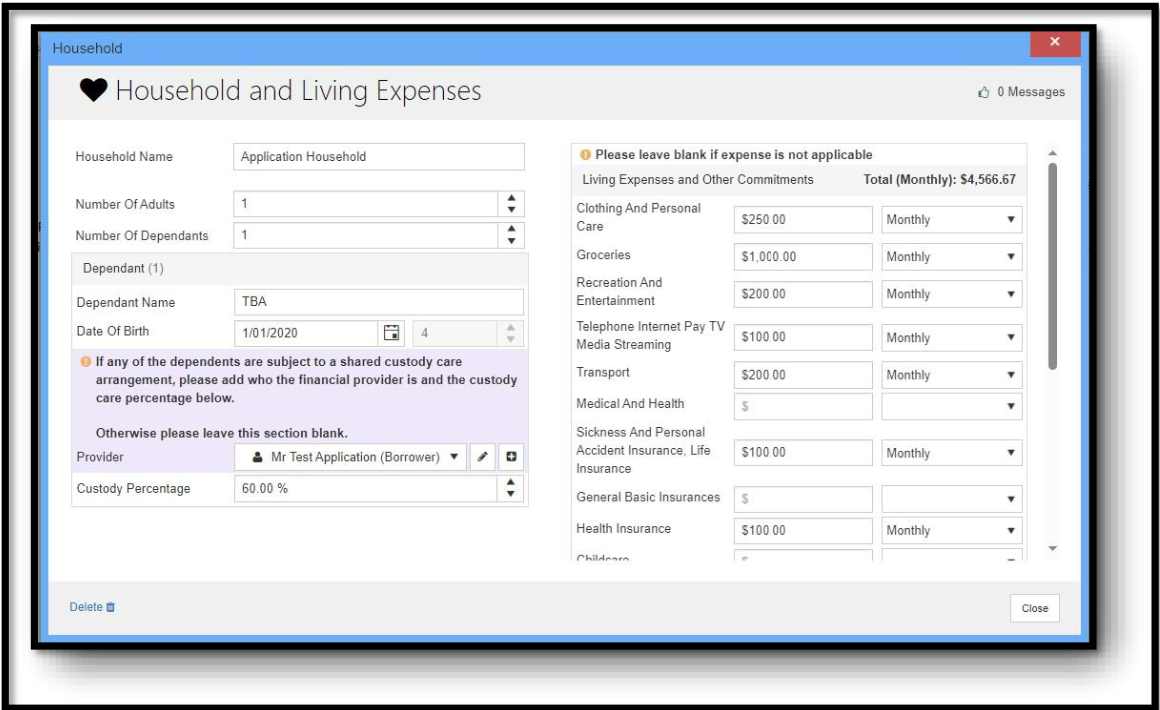
1. Applicant details: Enter the customer as a single applicant.
2. Household and Living Expenses: Under this section, enter 1 child in the Number of Dependents field.
3. Dependent information: Enter the dependent's name, date of birth, and the applicable custody care percentage as per the registered child support agreement, in this case, 60%.
4. Customer's living expenses: Enter the customer's declared living expenses into the living expenses section of Loanapp. The customer must also include a provision for any additional expenses for caring for the child 60% of the time (e.g., food, recreation, clothing) in their declared living expenses.
5. Child and spousal maintenance: Enter the child maintenance payable as determined by Services Australia.

Scenario three: single applicant with three children and different custody care percentages
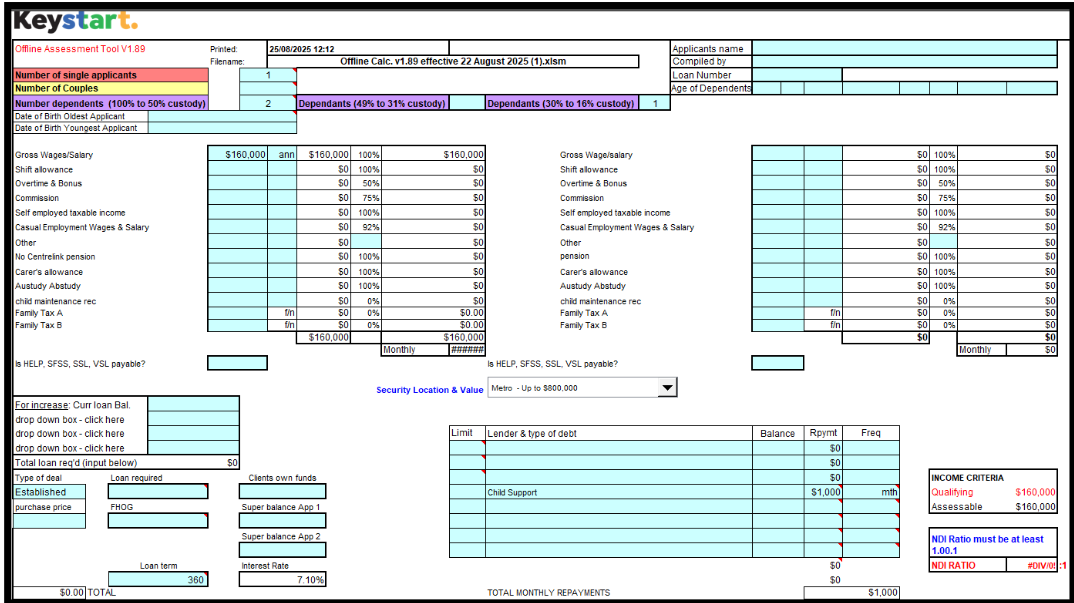
Offline calculator:
In this example, the child custody arrangement is 25%, 50% and 100%.
1. Relationship status: Enter the customer as a single applicant at the top of the calculator.
2. Number of dependents: Enter the number of children into the relevant custody care percentage box. In this case, custody care is 25%, 50% and 100%. Enter as below.

3. Child support payments: Any child maintenance payable as determined by Services Australia must be entered as a commitment/liability.
4. Living expenses: Enter the customer's declared living expenses into the living expenses section. The customer must also include provision for expenses related to caring for the three children at the time in their declared living expenses.
Lodging an application through Loanapp:
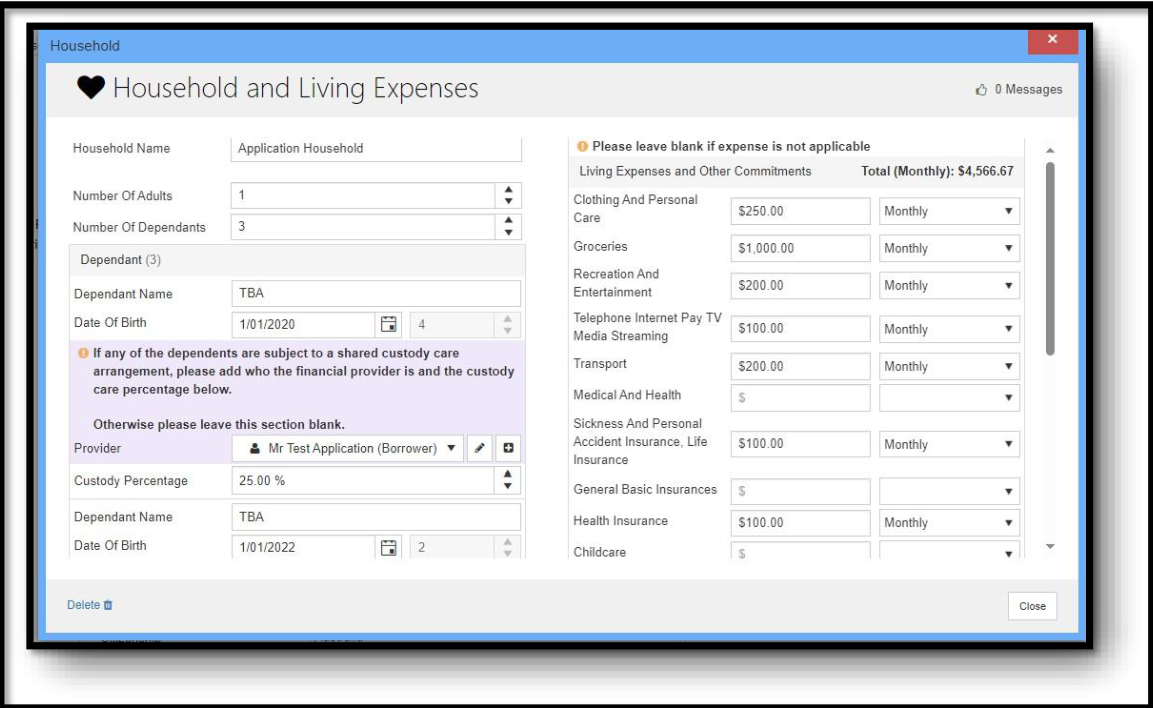
1. Applicant details: Enter the customer as a single applicant.
2. Household and Living Expenses: Under this section, enter 3 children in the Number of Dependents field.
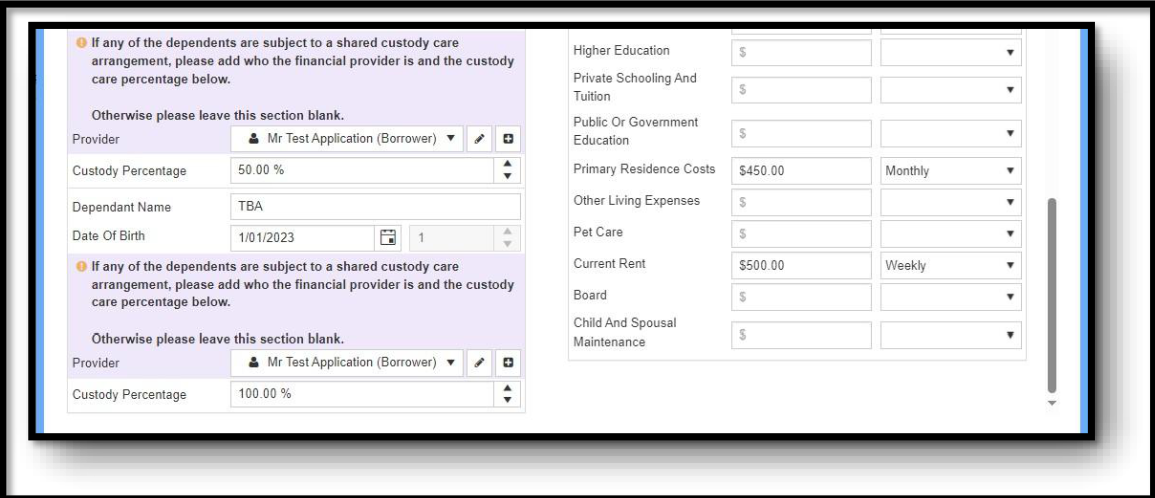
3. Dependent information: Enter the dependent's name, date of birth, and the applicable custody care percentage as per the registered child support agreement.
4. Customer's living expenses: Enter the customer's declared living expenses into the living expenses section of Loanapp. The customer must also include a provision for any additional expenses for caring for the children (e.g., food, recreation, clothing) in their declared living expenses.
5. Child and spousal maintenance: Enter the child maintenance payable as determined by Services Australia.
-
/guideicon-plane.svg?sfvrsn=80ddc250_3)
Log in to Broker Portal
Easily track applications, stay up to date with processing times, access your customers' loan details and training and resources all through Keystart Broker Portal.
-

Speak to our Broker Support Team
Have a question? Our Broker Support Team is here to assist you with products, policy and next steps, supporting you every step of the way.
-

Submit a scenario
Have questions about a scenario? Email us the details and we'll reply as soon as possible.