How to access Centrelink debt statement
Learn how to access your Centrelink debt statement online to provide required documents for your Keystart home loan application process.

Centrelink debt statement
As part of your home loan application, we need to understand your complete financial position. This includes any outstanding debts or payment arrangements you may have with Centrelink. The Money you owe statement helps us assess your overall debt commitments and make sure we're lending responsibly.

How to access your Centrelink debt statement
1. Log in to myGov
Visit my.gov.au and sign in to your myGov account using your username and password.
2. Select Centrelink
Once you're logged in, under Linked Services, click on Centrelink.
3. Navigate to Money you owe
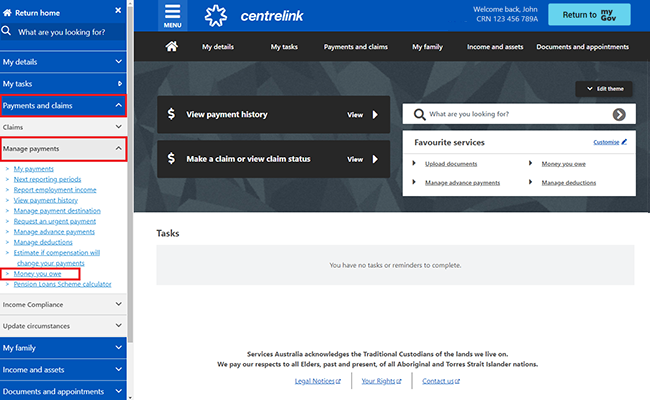
Select Menu from your homepage. Click Payments and claims, then expand Manage payments, and click Money you owe.
4. View your debt summary
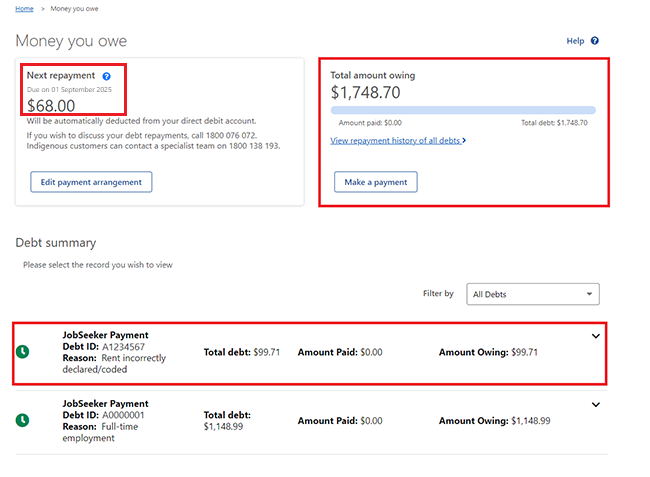
Money you owe page will open, showing your next repayment, the total amount owing, and the debt summary. Click the arrow icon to view more details about your debt, then take a screenshot of this screen. Make sure your screenshot includes your CRN number in the top left and the date and time visible in the bottom corner of your screen.
-
/guideicon-plane.svg?sfvrsn=80ddc250_3)
Log in to Broker Portal
Keep on top of your accreditation, access the forms you need and stay up to date with the latest news and updates through Broker Portal.
-

Speak to our Broker Support Team
Have a question? Our Broker Support Team is here to assist you with products, policy and next steps, supporting you every step of the way.
-

Submit a scenario
Have questions about a scenario? Email us the details and we'll reply as soon as possible.